
Demystifying terminology
There are so many terms and acronyms used in safety technology. Trackplot explains the phrases and concepts relating to lone worker monitoring systems and devices to clarify the jargon.
1. Mobile communications in safety technology
a) What is GSM?
GSM stands for Global System for Mobile Communication and refers to the technology behind 2G mobile networks. This standard has been widely used in Europe and other parts of the world since the early 1990s.
GSM is becoming increasingly obsolete and many telecommunications carriers have already decommissioned their GSM networks.
Newer technologies such as Long-Term Evolution (LTE), used in 4G, are replacing GSM.
b) What does 2G, 3G, 4G and 5G refer to?
2G, 3G, 4G and 5G refers to the iteration of cellular network in use e.g. 2G stands for the “second generation” of wireless communication technology. The latest 5G mobile communications standard is intended to replace 4G, allowing wireless internet access at a much higher speed.
In the UK
-
Many mobile providers have already switched off their 3G network to make room for the more advanced 4G and 5G networks.
If you have older devices using 3G you should check with your mobile provider for their 3G switch-off date.
-
2G continues to operate as it enables users to send SMS (Short Message Service) text messages and does not require internet to work.
In the UK mobile network operators will switch off 2G by 2033 at the latest.
c) Mobile or cellular?
These terms generally refer to the same functionality: a telecommunications wireless network which users can access using a “mobile phone” (UK) or “cell phone” (US).
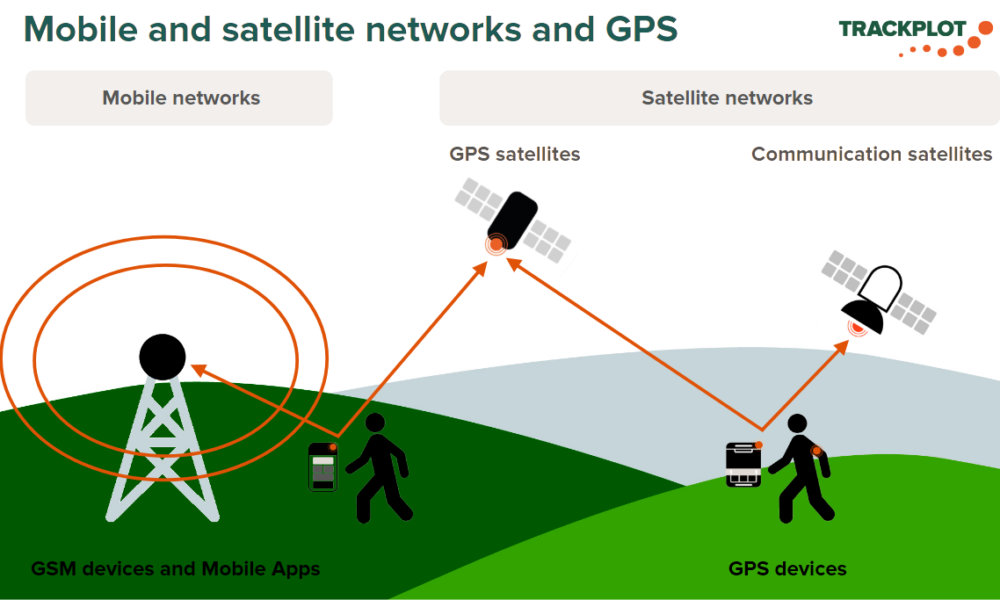
Mobile phones connect to the closest land-based mobile tower, if you move to a different area the phone reconnects to closest there. That is why you might experience weak signal or no coverage as the nearest tower is too far away. However constructing a large number of towers can be costly and difficult for mobile network operators, even impossible in remote areas.
d) Wi-Fi versus Mobile Data?
When you connect your smartphone to the internet, you’re using either Wi-Fi or mobile data.
Wi-Fi is a wireless networking technology that uses radio waves to provide wireless high-speed, unlimited internet access. It accesses local internet via a router (e.g. home or café) without using your mobile plan.
Mobile data uses cellular networks (4G/5G) to send and receive information. It enables anytime access for browsing, streaming, and app usage via mobile towers. It is typically purchased in monthly allowances (MB or GB) as part of your mobile plan from your network provider.
2. Satellite communications explained
There are two types of satellites: communication satellites and GPS satellites (see Point 3).
Satellite communication networks offer broader coverage than mobile networks. Satellite communication networks cover vast areas and no towers are required, so coverage extends to the hardest to reach locations. Satellite devices transmit signals via communication satellites orbiting the earth. The signal from your device transmits directly to the nearest communication satellite, which then sends the signal to the nearest gateway, or land-based centre, which then transmits the signal to the receiver, which can be a landline, mobile phone, another satellite device or a system such Trackplot’s Portal.
3. What is GPS and what does position mean?
The Global Positioning System, also known as GPS, is a separate satellite-based navigation system consisting of a large constellation of GPS satellites.
Both mobile network-based and satellite network-based devices usually have a GPS receiver inside to receive the position of the device from a GPS satellite.
Position is the exact point, in this case of a worker, and is defined by coordinates (in Trackplot’s case this is latitude and longitude). Once your GPS Device has obtained a position this information is then transmitted to a low earth orbiting communication satellite. This in turn will relay the message via a Ground Receiving Station to a receiver such as the Trackplot Portal. If you’re using a mobile phone, once your phone has acquired a position it will relay this via the mobile phone network to the Trackplot Portal.
When a worker uses a feature on their device e.g. SOS, this sends their details including their position to inform the rescue mission. This can be referred to as being geotagged.
4. Device types explained
Devices are either satellite network-based or mobile network-based.
- Satellite network-based devices are typically referred to as GPS devices.
- Mobile network-based devices are typically referred to as GSM devices or are Apps developed for smartphones.
5. What are dedicated and shared devices?
A device and its’ associated subscription can be allocated and locked to a specific user or placed in a pool to share and assign to a user as needed. Typically dedicated devices are allocated to workers who regularly lone work. Pooled devices are held centrally for irregular or infrequent lone workers to book as needed. This is a cost effective way to provide the flexibility required.
6. Describing device functionality
The functionality provided depends on the device: some devices offer one specific and limited function e.g. a panic button whereas others offer a range of features such as:
- Welfare Check or Check-in, often a timed alert to confirm the worker is safe and well.
- Hazard or Timed activity, such as meeting / visit, which can be higher risk than normal tasks.
- Fall detection / immobility / worker down, i.e. indicating the worker has either fallen or is immobile. Care needs to be taken when considering this feature as it is not appropriate for certain roles and can trigger too many false alarms.
- Red Alert / SOS / 999 / Panic alarm, usually handled by an ARC to liaise with the emergency services.
- Amber Alert / Assist, to warn of a lower level incident and the worker needs help.
- Tracking, to capture the worker’s position at a regular interval e.g. every 10 minutes.
- Geofencing, which creates a virtual boundary, and issues an alert when crossed by the worker.
- Near-field communication or NFC is a set of communication protocols that enables communication between two electronic devices over a short distance (4cm or less).
- Bluetooth is a short-range wireless technology standard using radio waves. It does not need mobile connectivity to work. It is used for exchanging data between fixed and mobile devices over short distances, typically up to 10 metres. It enables cable-free, direct connections for devices like headsets, speakers, mice, keyboards and hands-free mobile calling from a car. In this instance a mobile phone could connect with a panic button by bluetooth for example.
7. More about App functionality
Users need to be aware that Lone Worker Apps typically require location sharing to be switched on to enable features to work.
Lone Worker Apps often offer additional features related to the mobile itself and the mobile network:
- Limited Coverage Mode / Low Signal Mode / Smart Signal Detection / Cellular Blackout / Dead Zone Alert, advises there is no Wi-Fi or 3G / 4G / 5G mobile network coverage to send a message so the App will revert to using SMS instead.
- Battery strength, advises mobile phone battery is low. The user may decide to switch off certain functions such as Tracking, which drains the battery, to conserve power for vital functions such as Red Alert / SOS / 999 / Panic alarm.
8. Options for non-smartphone users?
Consider if there are other ways for users without a smartphone to keep in touch e.g. phone from a landline, text from a Standard Mobile Phone.
9. What is an Alarm Receiving Centre (ARC)?
An ARC is a secure, 24/7/365, controlled monitoring facility where trained operators receive, assess and respond to alerts from fire, security and personal safety systems. The ARC operators typically communicate with the person at risk, to establish if the alert is a false alarm to minimise the number of calls passed to the emergency services, and liaise with the appropriate service e.g. police, ambulance, mountain rescue, to resolve the incident.
10. What is an online Portal?
Is there a cloud based online hub allowing you visibility to manage your workers and your devices? Does it provide accessibility 24/7/365 and for security and GDPR compliance is the hosting in the UK?
How Trackplot can help
Trackplot can provide a combination of mobile and satellite based technologies, devices and functionality to suit your requirements: this is influenced by the location and risk profile of each user and we discuss this during onboarding.
Trackplot World, our satellite-based package, offers both 1-way and 2-way communications.
Trackplot Mobile can operate using any available mobile network, whether that is 2G, 3G, 4G or 5G.